
To make a wedding website, pick a wedding platform (Zola, The Knot, Joy or Minted), a site builder (Squarespace or Wix), or your own one-page site put online at a link. Add the day's details, turn on a guest password, and print the link or a QR code on the save-the-dates.
Creating a wedding website is the easy half. The step that trips couples up comes later: guests open the link from a card months after it was mailed, on a phone, often on the way to the venue. So the address has to survive every change, and the wedding website password has to be easy to type with one thumb.
Hostsmith, the host we build, is one place to put that third route's page online. The wedding platforms come first, because for most couples they're the right call.
What to put on a wedding website
Start with what guests tap most, in phone order:
- Names, date and start time. Top of the page, no scrolling.
- Ceremony and reception venues, each with a map link.
- Schedule: welcome drinks, ceremony, reception, after-party, brunch.
- Travel and hotel blocks, with booking deadlines.
- Dress code. Describe it and skip the orders (A Practical Wedding's rule, checked November 26, 2026). "The ceremony is on grass" helps.
- RSVP link and deadline.
- Registry links.
- FAQ: parking, kids, plus-ones, an unplugged ceremony, and anything unusual (A Practical Wedding's example: "IS THERE A THIRTY-MINUTE HIKE?").
- Wedding party.
- Your story and one or two photos.
Emily Post's wedding website tips add transport, plus meal choices and allergies on the RSVP. Gifts are "requests not demands" (checked November 26, 2026).
Keep it to one page with anchor links at the top. Each extra page is one more tap for a guest on the venue's Wi-Fi.
A welcome message that sounds like you
Two or three lines at the top, next to a favorite photo (Minted's guide suggests the same pairing). Two to steal:
- "We're getting married, and we'd love you there. Everything you need is on this page."
- "If you're reading this, you're on the list. See you on the dance floor."
What to leave off, or put behind the password
Emily Post flags the classic mistake: posting the rehearsal dinner when not every guest is invited. Keep smaller events off the shared page.
Or use Joy, whose FAQ says you can set schedule visibility so "only particular wedding events and their details are shown to only specific guests" (checked November 26, 2026).
Also leave off your home address, "first kiss" story prompts (Emily Post calls those out too), and anything you wouldn't want a stranger with the link to read. Links get forwarded. Hotel booking codes are fine behind the password.
How to make a wedding website: 3 ways
Pick by what you want:
- RSVP, registry and a guest list in one place, at $0: a wedding platform.
- A design you control on a general builder: Squarespace or Wix.
- You already have a page (made with an AI chat, from a template, or by a designer friend) and want it at a link you control: your own page, put online with a host.
A wedding platform (Zola, The Knot, Joy, Minted)
All four publish at $0 with RSVP tools, a registry and a password setting. As of November 26, 2026:
- Zola says its sites are "free to create and publish"; a custom domain is extra.
- The Knot says its wedding websites "are completely free to use".
- Joy says its "wedding websites, planning tools, and registry are free".
- Minted lists its website at $0, on an address made from your names on minted.us, with a custom domain upgrade, per Minted's guide.
The trade-off: your site lives at the platform's address, and your guest list lives in its account.
A website builder (Squarespace, Wix)
- Squarespace: its FAQ says "Plans start at $19 per month when paid annually".
- Wix has a Free plan on a wixsite.com address. Light, at $17 a month billed yearly, is the cheapest plan that connects your own domain and removes Wix branding (plans page).
Your own page, made with AI or from a template
Making your own wedding website starts with one chat. Ask Claude or ChatGPT for one HTML file:
Build our wedding website as a single HTML file. Phones come first: a single column, 18px body text, large buttons. All CSS goes in the file; load no scripts or fonts from other sites. Open with a menu of anchor links, then these sections in this order: welcome message; date and start time; ceremony and reception, each with a Google Maps link; schedule; travel and hotels; dress code; RSVP button linking to RSVP_FORM_URL, with the deadline; registry links; FAQ (parking, kids, plus-ones, unplugged ceremony); wedding party; our story. Fill every section with sample text to swap out.
Then:
- Save the reply in a plain-text editor as
index.html, then check it in your phone's browser (how to open an HTML file on iPhone). - Anything off? Tell the chat in plain words: "move the RSVP button up", "make the map links bigger".
That's the DIY wedding website route; more on building a site with Claude.
Wedding website platforms, builders and hosting compared
| Service | Cost to publish | Guest password |
|---|---|---|
| Zola | $0; domain from $17.99 | One site password |
| The Knot | $0; domain optional | Password switch |
| Joy | $0 | Event password, per page |
| Minted | $0 | Site password, per page |
| Squarespace | From $19/mo yearly | One site-wide password |
| Wix | $0 on wixsite.com; Light $17/mo yearly | Page passwords |
| Google Sites | Not stated | Restricted to people you add |
| Your own page on Hostsmith | Free plan: 1 site, watermark | Starter, $5/mo yearly |
Sources, checked November 26, 2026: Zola, The Knot, Joy, Minted, Squarespace, Wix, Google Sites and Hostsmith pricing. The password details come from each vendor's help page, linked in the private section below.
Zola or Joy (WithJoy)? For side events, Joy's schedule visibility (above) can show the rehearsal dinner only to its guests; Zola's password covers the whole site.
Put your own page online (even from your phone)
- Got photos? Ask the chat to show them by file name (for example
photo1.jpg, saved as JPG), and zip the page and those files in one folder on a computer. No photos? The HTML file goes up alone. - Drop the file, or the ZIP, at hostsmith.net.
- Type your site name. It becomes
your-names.us.hostsmith.link. - Sign in to publish.
- Test the address on your phone.
The drop box takes one file, so a single HTML page saved on your phone can go up from the phone's browser.
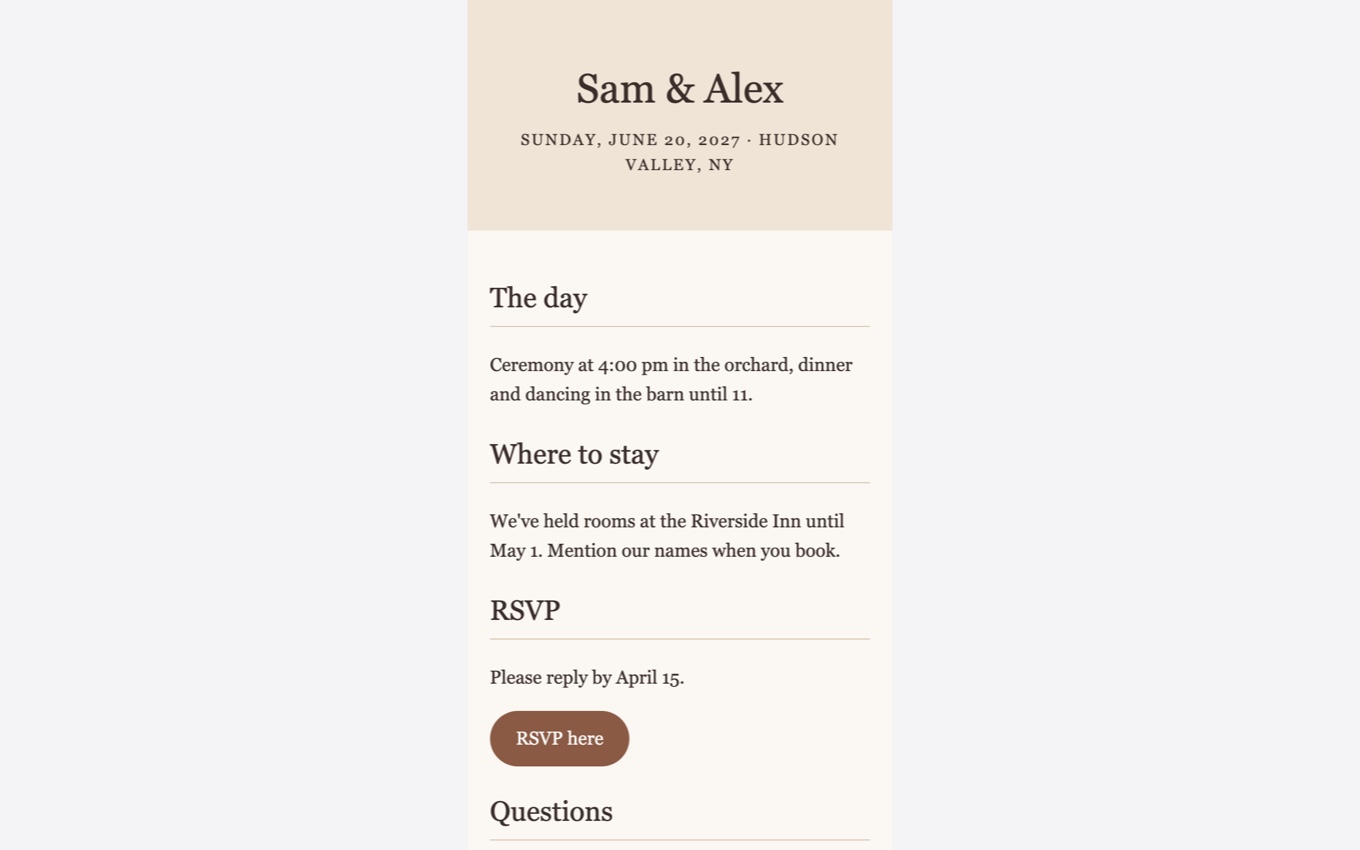
A sample one-file wedding page at sam-and-alex.us.hostsmith.link, at phone width (paid plan, so no watermark), November 26, 2026.
On Hostsmith's Free plan, as of November 2026 (pricing):
- 1 site
- 5 GB of bandwidth a month
- 5 MB of storage, with each file capped at 5 MB too, so compress your photos; a photo-heavy page needs Starter's 50 MB
- the Hostsmith watermark ("Hosted on Hostsmith") on the page
- no custom domain; your own domain starts on Pro, $15 a month billed yearly ($21 monthly)
- no credit card needed to sign up
Hotel list too long for the main page? Add travel.html to the ZIP, and it's served at /travel. For video, embed a YouTube link. More on turning a ZIP into a website.
Add RSVPs with a form you link
Your own page and Google Sites need an RSVP form from somewhere else; Hostsmith doesn't handle forms. Google Forms works (Google's help and its publishing help, checked November 26, 2026):
- Go to forms.google.com and click Blank form.
- Name it ("Sam and Alex RSVP").
- Add questions: name, attending (yes or no), meal choice, plus-one name. Put the deadline in the form's description. Leave Limit to 1 response (Settings > Responses) off, or every guest must sign in to Google.
- Click Publish at the top right, then Manage. Under General access, allow anyone with the link, then click Done and Publish.
- Click Published, then Copy responder link. Tick Shorten URL for a tidier link.
- Paste that link into your page's RSVP button.
Replies can go to a Google Sheet, so your guest list lives in your Google account.
How to make a wedding website private
To password protect a wedding website, turn on its site password and print it with the link. Hiding a site from search engines keeps it out of Google results, but anyone who has the link still gets in.
How each route does it, as of November 26, 2026:
- Zola: Account Settings > Privacy > "Website Password" > "Yes", enter it, save. Guests are asked for it before they see anything (Zola help).
- The Knot: Manage Website > the pencil icon next to your URL > toggle "Password protection" on > enter your password > Save Changes (The Knot help).
- Joy: one event password, at least 3 characters, not case-sensitive; Private asks for it on every page (Joy help).
- Minted: Settings > turn on Password Protection, and pick pages that stay open without it (Minted's guide).
- Squarespace: one site-wide password for everyone, re-entered after four hours (Squarespace help).
- Wix: page passwords; the site-wide one "is not currently available to all users" (Wix help).
- Google Sites: Restricted, with each guest added by name or email as a Published viewer (Google's help).
On your own page: Private Sites
On Hostsmith, a password comes with Private Sites, which start on the Starter plan: $5 a month billed yearly ($60 a year) or $9 monthly, with a 14-day trial. Keeping it up more than six months? The yearly $60 beats paying monthly.
Two ways in:
- Shared password. Guests open the link and type it. No account.
- Email list. Each invited guest signs in with Hostsmith using the Google account at the address you invited. Fine for ten relatives; a lot to ask of 120 guests.
For a wedding, we'd pick the shared password. More on the shared password vs email list trade-off.
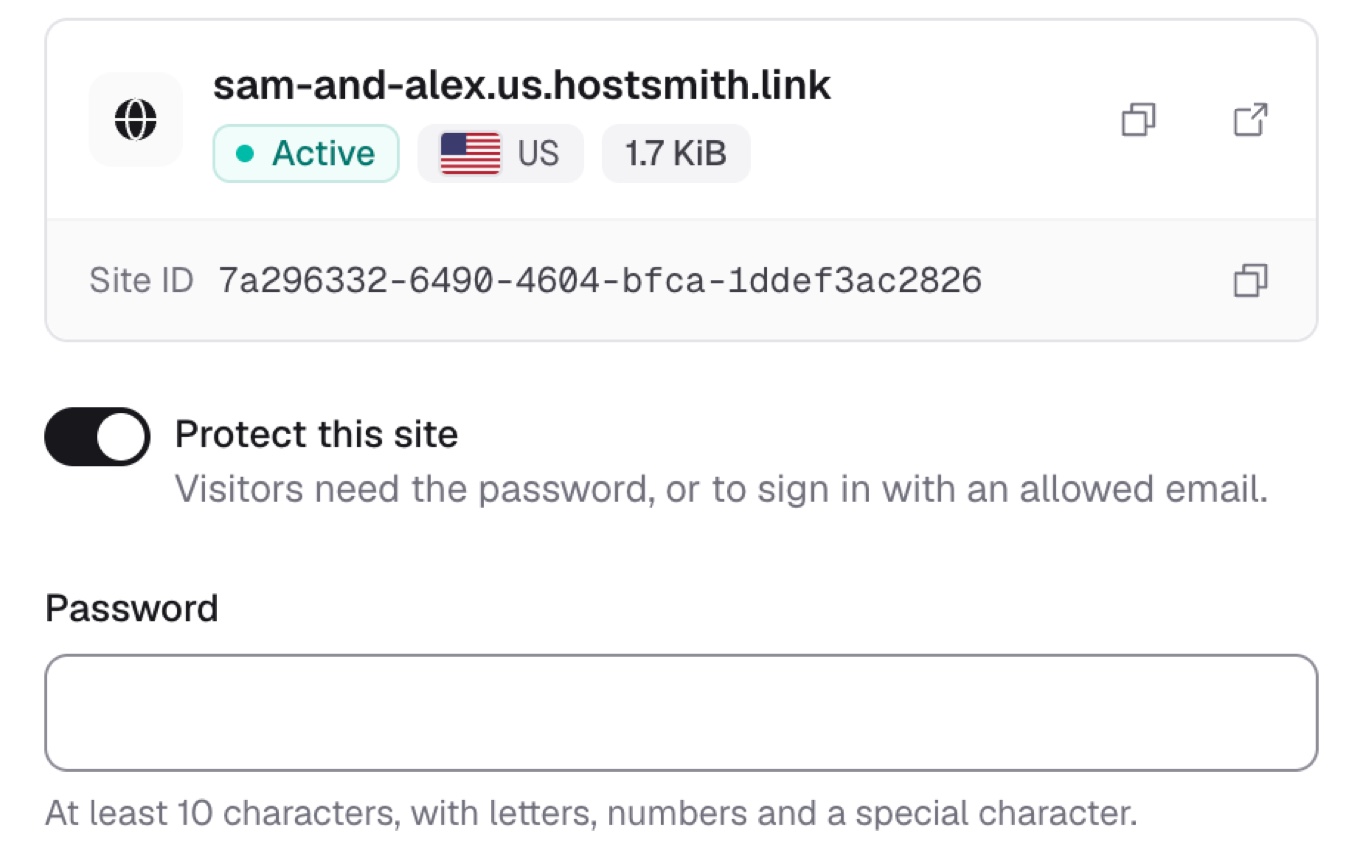
Turning on a site password in the Hostsmith dashboard, November 26, 2026.
A private wedding website on Starter is one site behind one password. A public schedule plus a private hotel page is two sites, so that's Pro.
The Free plan doesn't include Private Sites. The platforms' passwords cost $0, so on your own page the password is the part you pay for.
Picking a wedding website password
The best wedding website password is one a tipsy uncle can type on a phone:
- short, everyday words, like your surnames or the venue town
- few symbols; Joy allows only
!,&and+, and phone keyboards hide the rest - printed on the details card, next to the link
Hostsmith's site password is stricter: at least 10 characters, with letters, numbers and a special character. Surnames and the year joined by hyphens, like smith-jones-2027, pass and still type easily on a phone.
Zola, The Knot and Minted all say to share it on the save-the-dates and invitations. Change it if it leaks, and a change means telling every guest again. Bonus: Google can't read a page behind a password.
Share the link and update it without reprinting
A QR code for the save-the-dates
To make a QR code for your wedding website, open the site in Chrome on a computer and go to More > Cast, save, and share, pick Create QR code, then Download (Chrome help, checked November 26, 2026).
Print the address under the code as well; some guests will type it. Keep the site name short, too: the QR guide found that shorter addresses make simpler codes.
Wedding website URL ideas: your two first names plus the year (samandalex27), or your surnames. Skip hyphens and anything you'd have to spell out loud.
Can you edit a wedding website after publishing?
Yes, on every route. Zola: "make updates to your custom wedding website anytime there's a change in plans". Joy: "You can absolutely update your website at any time", though guests aren't notified automatically. Both checked November 26, 2026.
On Hostsmith, upload the new version to the same site from the dashboard, and it stays at the same address. So when the venue moves the start time, the printed QR code keeps working.
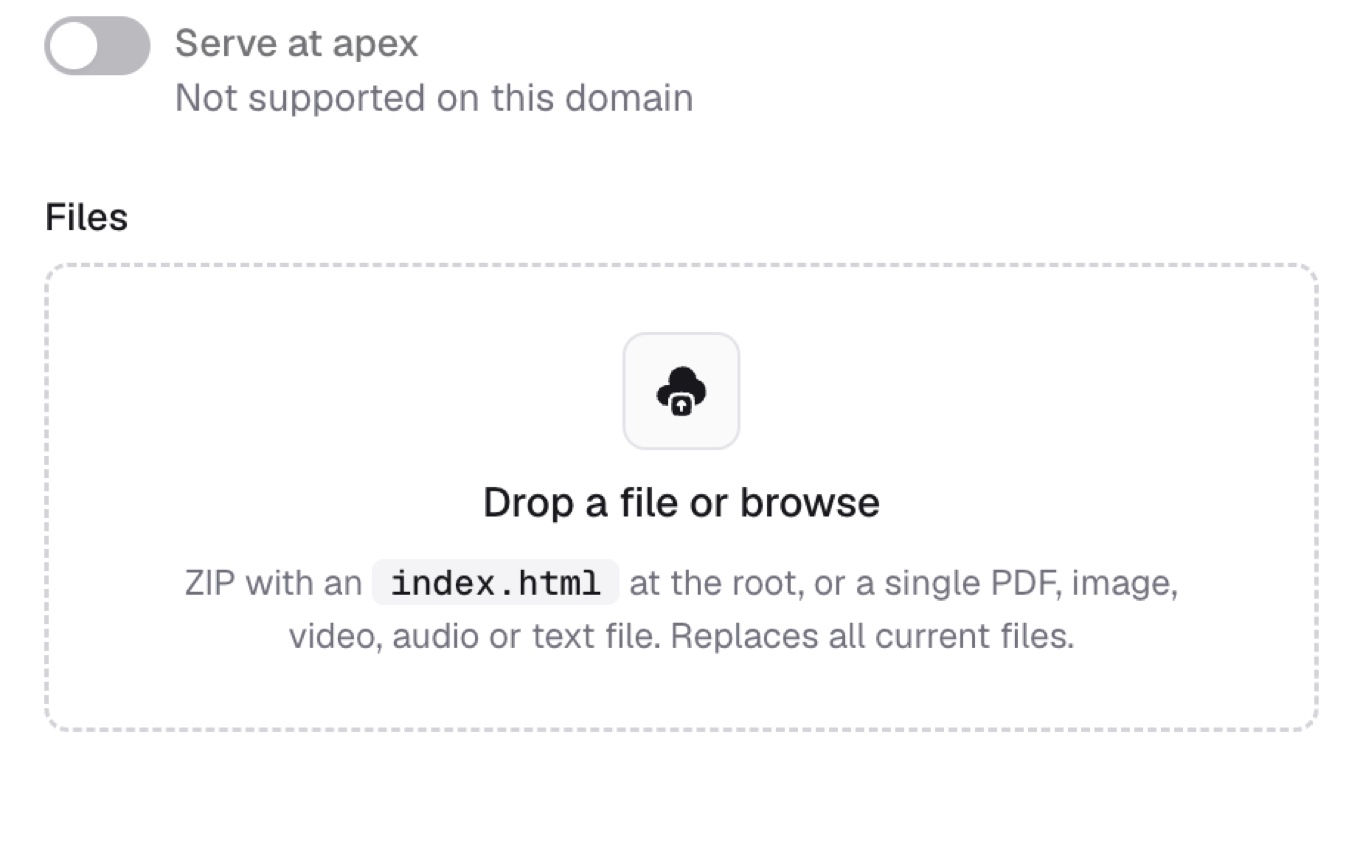
Updating a site's files in the Hostsmith dashboard: the new upload replaces all current files, November 26, 2026.
Every upload replaces the whole site. If your page has photos, upload the zipped folder again, photos included, even when you changed one line. Drop just a new index.html from your phone, and the photos are gone.
What happens to your wedding website after the wedding
Most stay up, but not all of them stay public. As of November 26, 2026:
- Zola: "Your account, website, and registry will never expire" (Zola help).
- The Knot: not stated on its cost help page.
- Joy: no expiry stated in its FAQ; album photos can be downloaded.
- Minted: its guide suggests turning the site into "a digital memory book".
- Squarespace: when the subscription ends, "your site becomes private" (help; canceling Squarespace).
- Wix: after a premium plan ends, the site stays online with Wix ads at the Wix address (help; canceling Wix).
- Hostsmith: the site stays up until you delete it, on every plan, Free included.
Our pick for the day after: swap in a thank-you page with a few photos at the same address, so the QR code on Grandma's fridge still lands somewhere nice (same trick as an "ended" event page). Emily Post's reminder: it "does not replace the individual thank-you notes".
Frequently asked questions
Q: Do I need a wedding website?
A: No, but it helps when guests travel, when details change, or when you want RSVPs in one place.
Q: When should you make a wedding website?
A: Before the save-the-dates go out if you can, and definitely before the invitations, per Emily Post.
Q: Can you make a wedding website for free?
A: Yes. Zola, The Knot, Joy and Minted publish a site at $0 with RSVP tools. Wix's Free plan uses a wixsite.com address and shows Wix branding. Hostsmith's Free plan hosts a page you made, with the Hostsmith watermark and no password.
Q: What should a wedding website password be?
A: Easy to say out loud, like your surnames or the venue town, and printed next to the link on the details card. On Hostsmith it needs at least 10 characters with letters, numbers and a special character, so something like smith-jones-2027 works.
Q: What should go in a wedding website FAQ?
A: Parking, kids, plus-ones, the dress code, an unplugged ceremony, the gift policy, and anything unusual, like a long walk to the ceremony.
The card is the part you can't edit
Almost everything on a wedding website can change after the cards go out: the start time, the hotel block, the shuttle. The link and password printed on the card can't.
Settle those two first, on any route, and type them into your phone once, the way a guest will. Then the card pulled from a pocket on the way to the venue still opens the right page.
If your own page is the one going on the card, here's how to password protect an HTML page on Hostsmith.