
A digital save the date, also called an electronic save the date, is a card image or a one-page site that you text, email or WhatsApp to guests in place of a mailed card. Send it 4 to 6 months before a local wedding and 8 to 12 months before a destination one. Use a $0 card from Zola or Joy's Free Digital range, a paid e-card service, or your own card or page, made with ChatGPT or Claude, at a link you pick.
A save the date used to mean a print run and a stamp per household, all to say "keep this weekend open"; now it often lands in a group chat. For the make-it-yourself route we'd point you at Hostsmith, the host we build, though a Zola or Joy card is all many couples need.
What to put on a digital save the date
The etiquette guides agree on the list:
- Both names.
- The date. For a weekend or destination wedding, give the range and say which day is the ceremony.
- The city and state, or the country. The venue can wait.
- "Formal invitation to follow," so guests know times and the RSVP come later.
- Your wedding website link, if you have one.
Exact times aren't needed, per Paperless Post's etiquette guide (published April 23, 2026), and Zola calls a photo optional. Leave the registry off; Joy's etiquette post puts it on the website or the invitation.
Save the date wording you can copy
A save the date text message (or WhatsApp), with the guest's name typed in:
Hi Carol! Sam and Alex are getting married on Sunday, June 20, 2027, in the Hudson Valley, NY. Save the date: link. Formal invitation to follow.
A save the date email:
Subject: Save the date for Sam & Alex, June 20, 2027
Dear Carol and Jim, we're getting married on June 20, 2027, in the Hudson Valley, NY. Details: link. Formal invitation to follow.
A destination version:
Passports ready? Names are getting married in Lisbon, Portugal, June 18-20, 2027. Travel tips: link. Formal invitation to follow.
Tired of the phrase itself? "Hold the date" and "Mark your calendar" do the same job.
When to send save the dates
Most guides say to send save the dates 4 to 6 months before a local wedding and 8 to 12 months before a destination one. Where they differ, checked November 26, 2026:
- Zola: those two ranges, and "no earlier than 8 months and no later than 4 months out" for most.
- Paperless Post: the same ranges, closer to a year for another country, and as early as possible for a holiday weekend.
- Joy (updated September 14, 2023): 4 to 6 months local, 10 to 12 destination.
- Emmaline Bride (December 13, 2023): 6 to 8 months local, 9 to 12 destination.
Are electronic save the dates OK? Who gets one
Yes. Emily Post's wedding email guide lists save-the-date notices among the email dos (checked November 26, 2026), though it still prefers paper for the invitation itself.
- Only people you're sure to invite. Zola says never send one to your "group B", the guests you'd invite if space allowed.
- One per household, per Zola.
- Names in the message, plus-ones and children included; one link can't greet each guest.
- A heads-up call that the email is coming, for the less tech-savvy, says Joy; Emmaline Bride would mail paper to anyone without email.
Evening-only guests? None of these guides says; a save the date promises an invitation.
4 ways to make a digital save the date
- A $0 card from Zola, or from Joy's Free Digital designs. Need a full wedding website too?
- A paid e-card service: Paperless Post, Greenvelope or Bliss & Bone, for extras like address collection.
- ChatGPT Sites, which builds and hosts a page inside ChatGPT. Per OpenAI's help page (checked November 26, 2026), it's "not available on Free or Go", new sites stay private until shared, and later versions publish to the same URL.
- Your own card or page, made with ChatGPT or Claude and put online at a link you choose, covered next.
| Service | Cost to send | How guests get it |
|---|---|---|
| Zola | $0 (designs marked "Free") | A link; text via Zola's app, or one by one |
| Joy | $0 for designs marked Free Digital; some paid | Email or a link; magic link collects addresses |
| Paperless Post | Free designs; Premium in Coins per guest; Pro $250/yr for 250 guests | Email, text or link |
| Greenvelope | From $19 a mailing (up to 20 people); trial up to 10 | Email, text, WhatsApp or a link |
| Bliss & Bone | $1.20 each (1-9), $0.90 (10+), $0.70 (300+) | Email, text or WhatsApp |
| ChatGPT Sites | A paid plan (Plus, Pro, Business or Enterprise) | A chatgpt.site link |
| Your own page on Hostsmith | Free plan: 1 site, watermark; Starter $5/mo yearly removes it | Any message: it's a link |
Sources, checked November 26, 2026: Zola, Joy, Paperless Post, Greenvelope, Bliss & Bone, ChatGPT Sites and Hostsmith pricing. Bliss & Bone charges per recipient, so 100 households come to $90.
How to make a digital save the date with ChatGPT or Claude
Make one of two things: a card image with ChatGPT, or a one-page site with Claude or ChatGPT.
- A card image, with ChatGPT. OpenAI's images help page (checked November 27, 2026) says "All ChatGPT plans include image creation in supported countries and territories". It can add text and makes an aspect ratio you choose; keep it with Download on the web or Save on mobile. Portrait 4:5 fills the width of a chat preview, and 9:16 fills a phone screen.
- A one-page save the date website, as an HTML file, with Claude or ChatGPT. Claude's artifacts help page lists single-page websites, on every plan, Free included; export the HTML when it's done. Sharing the artifact's own link needs a paid plan. In ChatGPT, ask for one HTML file.
Both help pages were checked November 26, 2026. The image is quicker; the page has a tappable website link. Once online, either one updates at the same address.
Prompt 1: the card image (ChatGPT)
Make a portrait 4:5 save-the-date card. Use exactly this text and nothing else: "Sam & Alex", "Sunday, June 20, 2027", "Hudson Valley, NY", "Formal invitation to follow". Style: watercolor hydrangeas on cream, with serif lettering.
Image models still fumble lettering, so check every character.
Prompt 2: the page (Claude or ChatGPT)
Make a save-the-date page as one HTML file for a phone screen: one column, large text, names and date visible without scrolling. Keep all CSS inline, with no external scripts or fonts. At the top: "Sam & Alex", "Sunday, June 20, 2027", "Hudson Valley, NY". Then our photo, photo.jpg, and "Formal invitation to follow". Add a button, "Our wedding website", linking to WEBSITE_URL, and a second, "Send us your address", linking to ADDRESS_FORM_URL.
Swap in the real links, then check the photo at the live link, since a phone's file preview skips separate images.
Put it online and send the link
- Drop the file at hostsmith.net. A card image goes up as one PNG or JPG, and its address opens it in a viewer page. A page with a photo goes up as a ZIP of
index.htmlandphoto.jpg; a page without one, as the HTML file alone. - Type a site name. It becomes the address, such as
samandalex27.us.hostsmith.link. - Sign in to publish.
A lone HTML file can go up from a phone's browser too; build the ZIP on a computer.
The Free plan gives you 1 site and 5 MB of storage, which also caps each file, so compress a large ChatGPT image first. It shows the Hostsmith watermark ("Hosted on Hostsmith"); Starter removes it (pricing, checked November 26, 2026). Starter also allows 1 site; if your wedding page is already on Hostsmith, add save-the-date.html to its ZIP, and it's served at /save-the-date, behind the site's password if it has one.
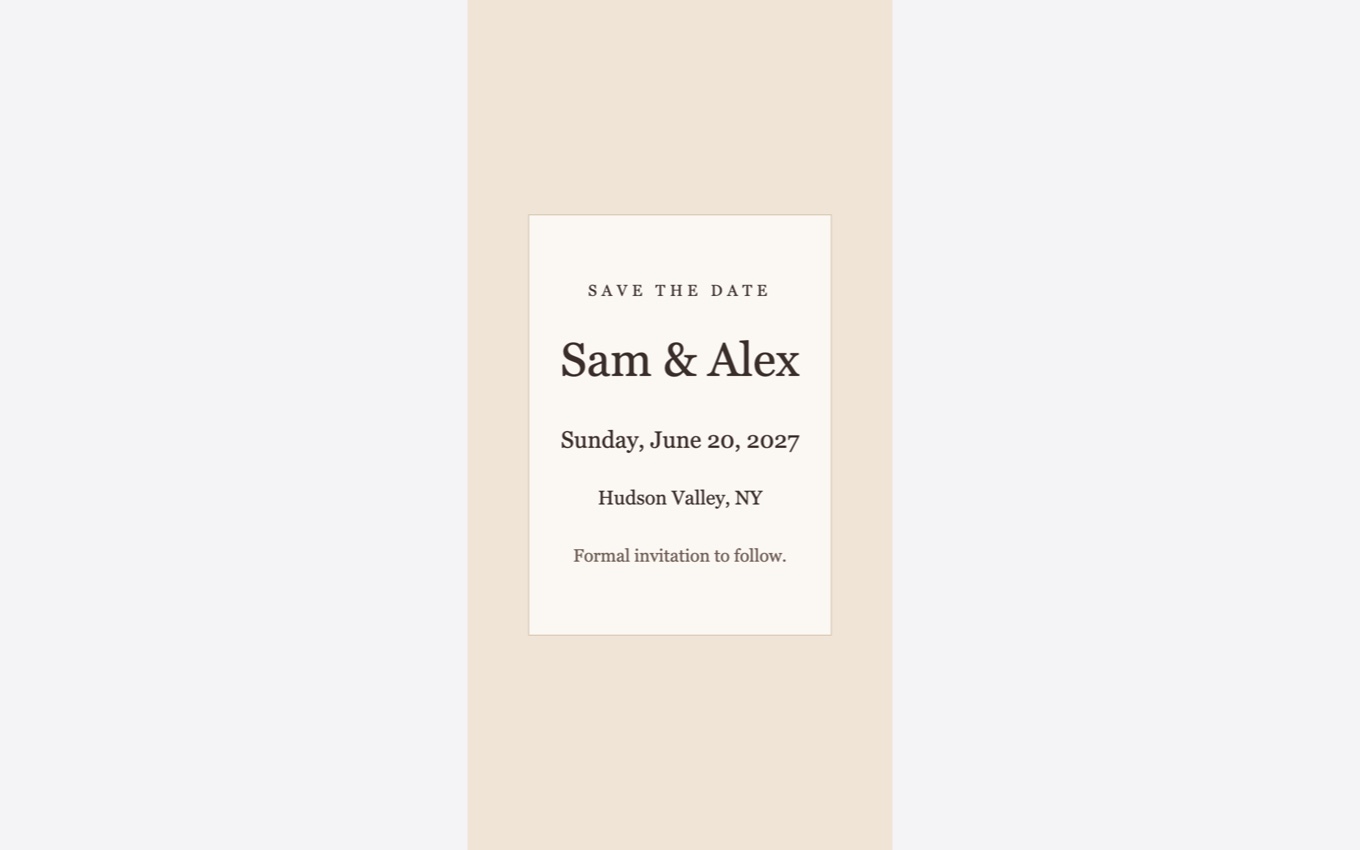
A plain sample save-the-date page, with no photo or buttons, at samandalex27.us.hostsmith.link on a phone (a paid test plan, with no watermark).
Then send it by text or WhatsApp, one by one or in small family groups, or by email. Printing a few cards as well? Add a QR code.
Collect mailing addresses with a form you link
Joy and Greenvelope collect addresses in-platform. On your own page, point the "Send us your address" button at a Google Form, since Hostsmith doesn't handle forms; the wedding guide's form steps work with name, mailing address and email as the questions.
Does a save the date need a password?
Usually not. If your page lists the venue or someone's home address, Hostsmith's Private Sites (a shared password or an email list) start on Starter: $5 a month billed yearly ($60 a year) or $9 monthly, with a 14-day trial. The password needs at least 10 characters, with letters, numbers and a special character; smith-jones-2027 passes. More on picking a password guests can type.
Change the date or venue without sending a new link
Put the new version on the same site, and within a couple of minutes the link guests already have opens the new details. On Hostsmith, use the dashboard. Every upload replaces all of the site's files, so upload the photo again with the page, even for a one-word fix (the full warning).
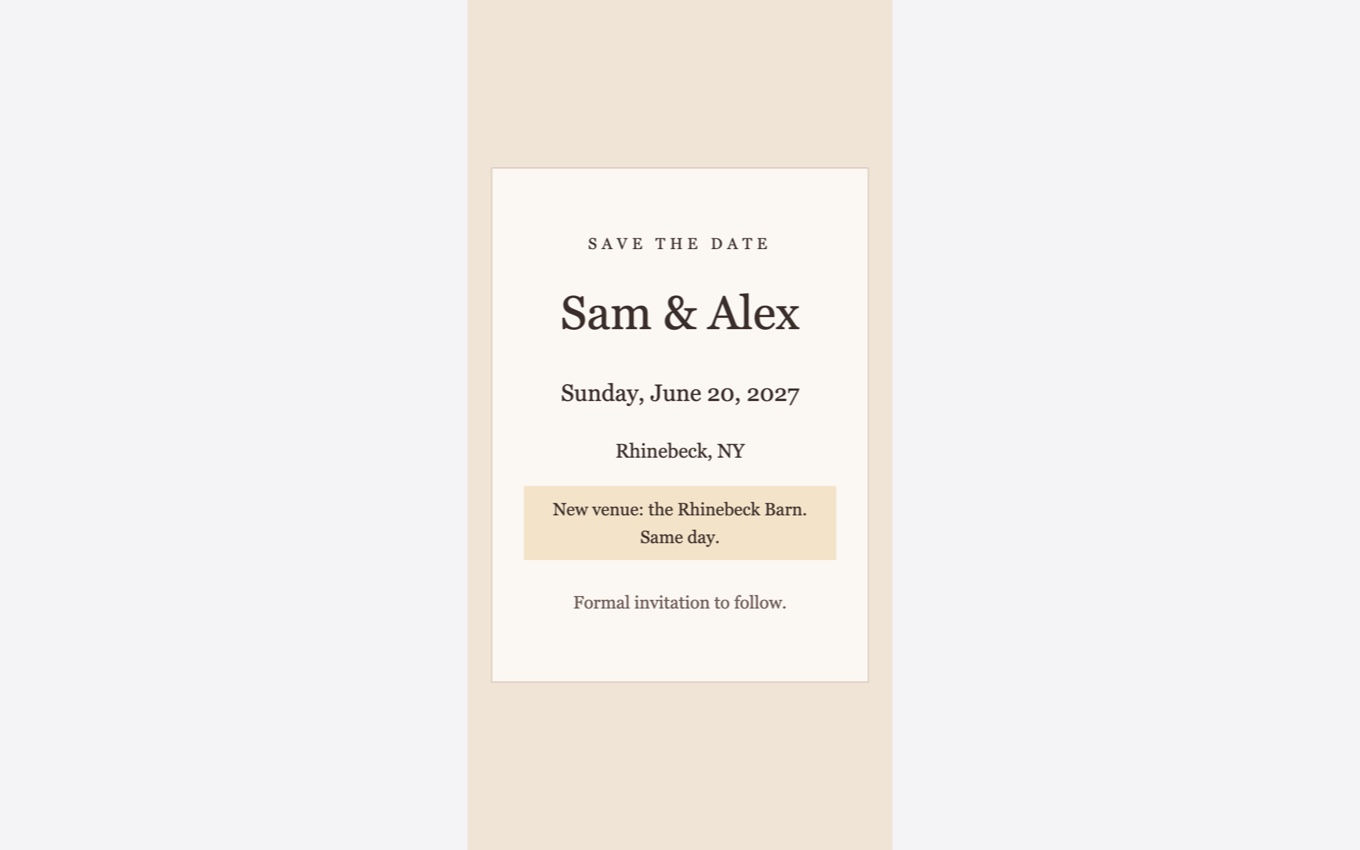
The same address, samandalex27.us.hostsmith.link, after one new upload: the city line now reads Rhinebeck, NY, with a note naming the new venue.
Other routes keep the link too: Greenvelope's pricing FAQ says you can "update your card" after it's sent (checked November 26, 2026), and ChatGPT Sites republishes to the same URL. On your own page, the file is yours and you pick the address.
Zola says to sign the venue contract before the cards go out, to avoid "change the date" cards, but contracts fall through. A big change still deserves a short message to everyone; nobody rereads a save the date for fun, and Joy's FAQ says guests aren't notified automatically of edits (checked November 26, 2026).
Frequently asked questions
Q: Is there a free way to create digital save the dates?
A: Yes. Zola's digital designs and many of Joy's cost $0. To put your own card or page online, Hostsmith's Free plan takes one site and shows the Hostsmith watermark.
Q: What are the best websites for digital save the dates?
A: Zola or Joy for a $0 card, Paperless Post or Greenvelope for paid designs, and your own page for a file and address you control.
Q: Is 2 years too early for a save the date?
A: Usually, yes. Zola says no earlier than 8 months for most weddings, and Paperless Post says closer to a year for a wedding in another country.
Q: How do you send a save the date by text?
A: Send it individually, with the guest's name, the date, the city, the link and a line saying a formal invitation will follow.
Q: Can you send save the dates by email?
A: Yes, Emily Post lists them among the things email suits. Use a clear subject line, such as Save the date for Sam and Alex, June 20, 2027.
Q: Do digital save the dates need an RSVP?
A: No. The formal invitation asks for it, and Paperless Post says save the dates need no RSVPs.
Send the link once
In 1998 Tim Berners-Lee wrote a page on the W3C site titled "Cool URIs don't change", and it has aged better than most of the web it was written for. A save the date puts it to a small test: one address, sent early and once, while the planning shifts behind it.
Made the card or the page? Drop it at hostsmith.net and you'll have a link to paste into the family group chat.